 Winterlamb Get the app
How to create a fitness challenge that fits your week
Choose daily tasks, set weekdays, a weekly target or a total by the end. Work through a sample brief, then check Winterlamb’s rules and access options.
To create a fitness challenge that fits your week, decide what counts, when it is due, and what happens if you miss a requirement. A daily task, a fixed weekday and a weekly target are different commitments, even when they involve the same activity.
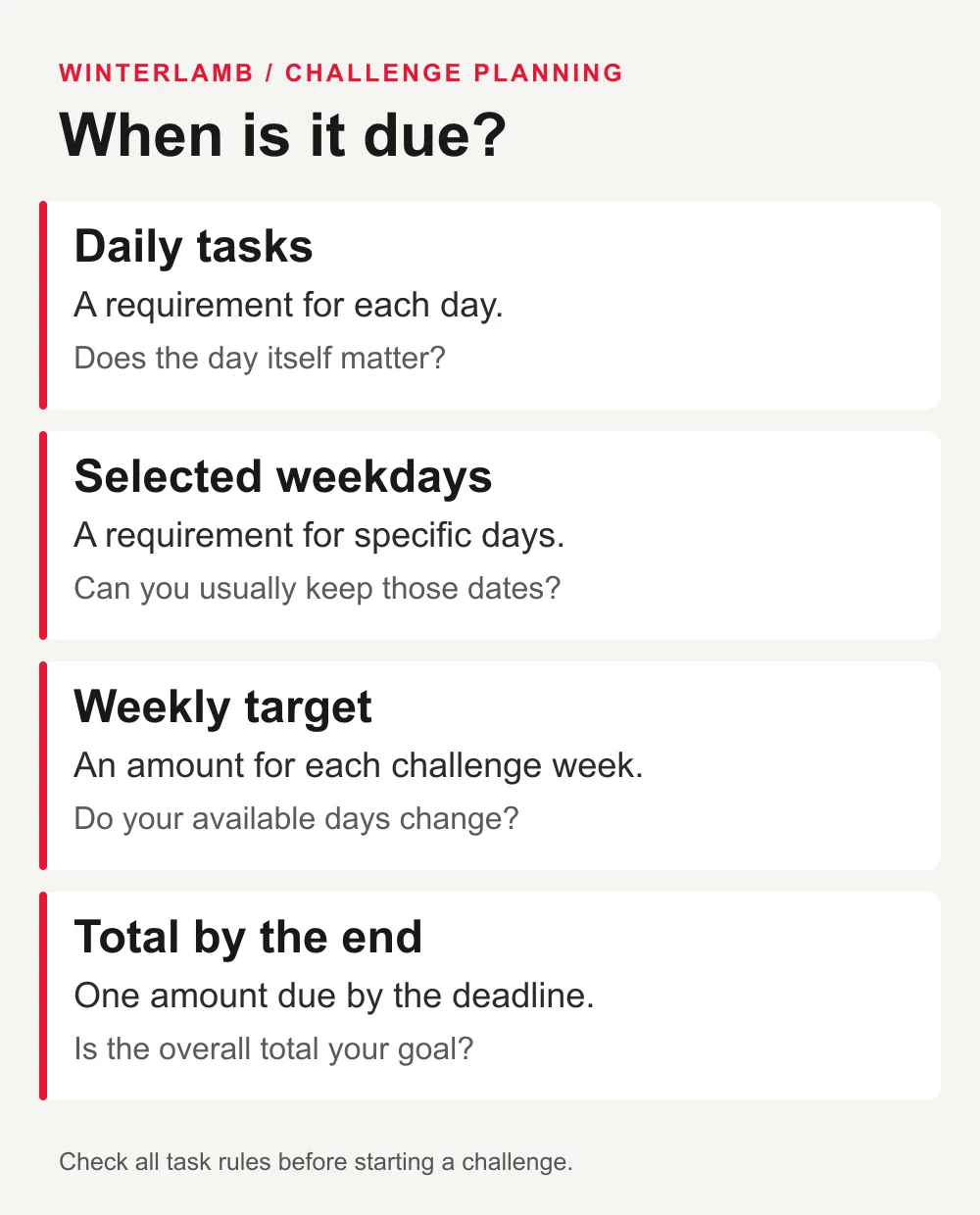
If your available days keep changing, start by looking at a weekly target. If the day itself matters, choose specific weekdays. Use a total by the end when the overall amount matters more than its distribution.
Winterlamb supports daily tasks, selected weekdays, weekly targets and a total by the end for private custom challenges. Creating one requires an active Winter Pass or membership. The examples below help you write a clear brief before choosing your challenge's actual settings and rules.
Decide what you are counting
“Walk more” leaves several questions unanswered. Are you counting walks, minutes or distance? Does each walk need to meet a minimum, or are you adding up activity over a longer period?
Consider two example goals:
- Record two walking workouts in a week.
- Record 30 minutes of walking in a week.
They measure different things. One 30-minute walk would meet the time total, but it would still be only one workout. Two short walks might meet a workout count while falling short of a time target.
These numbers illustrate counting rules. Choose the activity and amount for your own circumstances, then make the requirement explicit.
Winterlamb's custom challenges can use workouts, minutes, distance, repetitions or other check-ins. Check how the task is evidenced: a recorded workout and a repetition check-in are different kinds of record. The current challenge FAQ describes the available options.
Pick the schedule your goal needs
Daily tasks: the requirement applies each day
A daily task suits a commitment where doing something on each required day is part of the goal. A larger amount on another day does not change which day the activity happened.
For example, recording movement every day is a different goal from reaching one movement total across a month. Choose daily because you want that timing requirement, rather than because a daily streak is the default you had in mind.
Selected weekdays: the dates are part of the commitment
Use selected weekdays when particular days matter. A task due on Tuesday and Thursday is more specific than a task due twice during the week.
Before choosing fixed weekdays, check whether you can usually keep those dates. A session on Saturday is not the same event as a session due on Tuesday.
Weekly targets: the amount matters within the week
A weekly target describes what you want to complete during each challenge week. It can suit a commitment where the days may move but the weekly amount stays the same.
For an example target of two recorded walks, Monday and Friday or Wednesday and Saturday could both be suitable plans. Before starting, check the challenge's week boundaries, qualifying activity and any additional task rules.
Total by the end: work toward one overall amount
An end-total task gives you an amount to reach by the deadline. It does not, by itself, specify an equal amount for every day or week.
For example, a distance total over four weeks is different from four separate weekly distance targets. The totals could be equal while the timing requirements differ. Check whether the challenge also contains daily or weekly tasks before treating the whole plan as one flexible total.
Read the missed-requirement rule before starting
A schedule tells you when work is due. The missed-requirement rule tells you what happens if it is not completed.
In Winterlamb, a missed requirement ends a strict challenge attempt; flexible plans continue. Your recorded history remains available. Check the rule shown for the challenge you are starting instead of assuming every custom challenge behaves the same way. Winterlamb's FAQ explains this distinction.
Keep the attempt result separate from the workout record. An unsuccessful attempt can still contain workouts you completed.
A worked brief for an unpredictable week
Here is an illustrative brief for someone who already wants to take two walks each week but cannot commit to fixed days:
- Activity: walking.
- Measure: two recorded walking workouts per challenge week.
- Length: four weeks.
- Schedule: weekly, with the exact week boundaries checked before starting.
- Evidence: workouts that meet the chosen task's recording and activity requirements.
- Missed requirement: read the attempt rule before joining; choose a continuing plan if that is the behavior you want and it is available for your selected challenge.
This is a planning example, not a training prescription or a promise that every combination appears in the app.
Eight walks across four weeks would not necessarily satisfy a requirement for two walks in every week. Doing four in the first week would not erase a shortfall in the second.
Write your own version in one sentence: “I want to record [activity], measured by [count, minutes or distance], on [schedule], for [duration].” Then check the rules against that sentence.
What to check in Winterlamb
Sign in to create a private custom challenge. Custom creation requires paid access; free workout recording is a separate feature. You can browse the catalogue before committing, and selected challenges marked Free are available with an account.
For a workout-based task, the record must match the challenge's requirements. On iPhone, workouts recorded in Winterlamb or imported through Apple Health can qualify; workouts added to Apple Health by hand do not count. You do not need an Apple Watch to record on iPhone.
If you would rather try an existing challenge first, Daily movement · 30 days is one of the free options. A walk counts there when it is recorded as a workout with active time, with no minimum duration or distance for that challenge. Other challenges can set specific targets. See the current free and paid options.
Start by writing the commitment, then browse Winterlamb's challenges for the schedule and rules that match it. Check the amount, timing and access conditions before the first day.